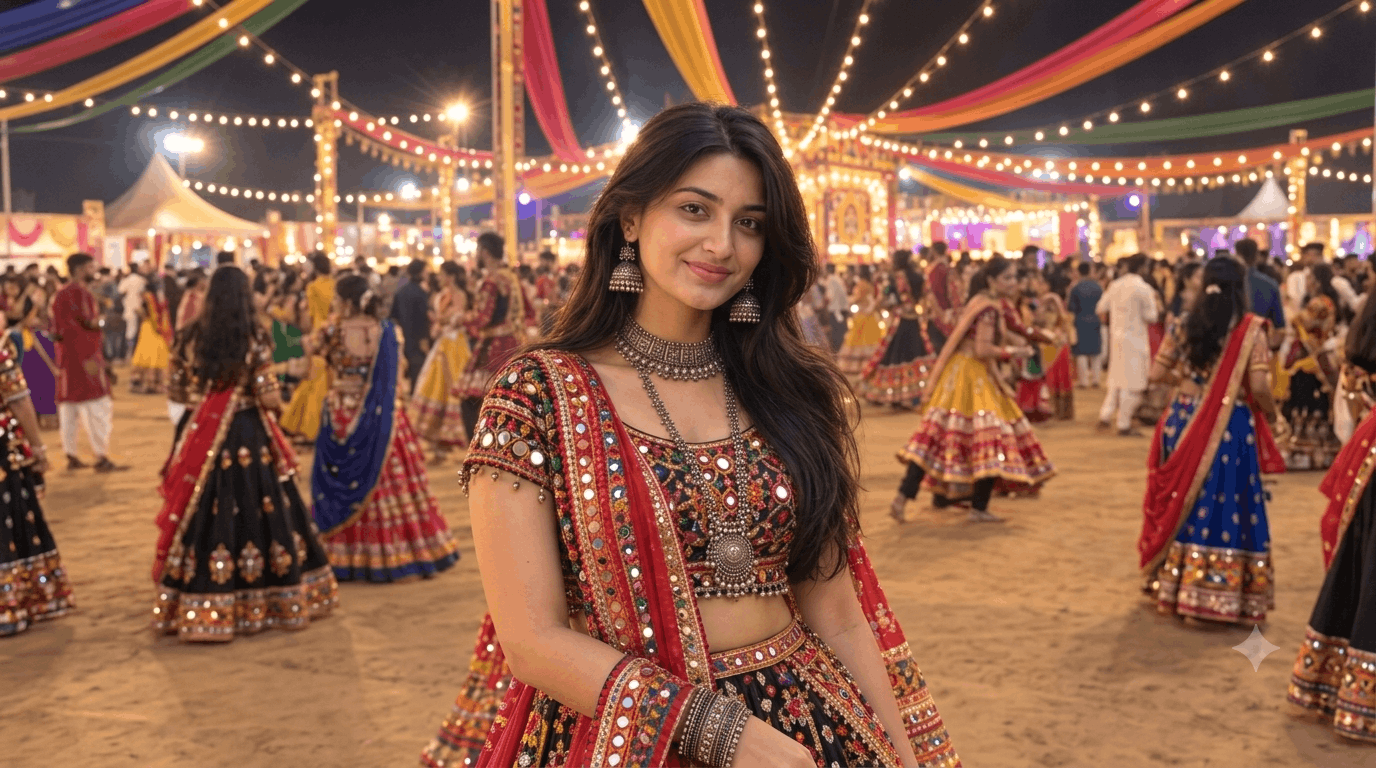
Navratri is one of the most vibrant, colorful, and energetic festivals in India. Celebrated with immense enthusiasm, it brings together traditional dance, colorful traditional attire, glittering ornaments, and festive decorations. In the age of artificial intelligence, sharing eye-catching Navratri-themed photos on social media platforms like Instagram, Facebook, and Pinterest has become a huge trend.
Whether you want to create realistic photos for blog posts, social media thumbnails, or profile pictures, using AI image generators like Bing Image Creator, Midjourney, DALL-E 3, or Stable Diffusion makes the process effortless. In this article, we share the best Navratri AI photo prompts for girls, along with tips to customize them for perfect results.
Why Use AI Image Generators for Navratri Photos?
Creating high-quality festival photography often requires professional equipment, specific lighting setups, expensive traditional outfits, and extensive photo editing. AI image generation solves these challenges instantly:
Save Time and Effort: Generate high-resolution festive portraits in seconds.
Endless Styling Options: Experiment with different colors of Chaniya Choli, oxidised jewelry, lighting styles, and background settings.
Custom Aspect Ratios: Easily create 16:9 images for websites/blogs (1280×720 px), 9:16 for Instagram Reels/Stories, or 1:1 for profile pictures.
Top Navratri AI Photo Prompts for Girls
Here is a collection of expertly crafted prompts categorised by different themes, moods, and visual styles.
1. Traditional Garba Ground Scene (Vibrant & Energetic)
This prompt captures the authentic outdoor Navratri celebration with festive lighting and traditional dance surroundings.
Use the uploaded photograph as the sole and highest-priority reference for the person. Create a photorealistic Gujarati Garba-night portrait featuring the exact same person shown in the uploaded image. IDENTITY PRESERVATION — ABSOLUTE PRIORITY The uploaded person must remain clearly recognizable as the same individual. Preserve exactly: Facial identity and overall appearance Face shape and facial proportions Forehead and hairline Eyebrow shape, thickness, and placement Eye shape, size, spacing, eyelids, and natural expression Nose shape and proportions Lips and natural lip shape Cheeks, jawline, and chin Natural facial asymmetry Natural skin texture Exact skin tone and complexion from the reference…Use the uploaded photograph as the sole and highest-priority reference for the person. Create a photorealistic Gujarati Garba-night portrait featuring the exact same person shown in the uploaded image.
IDENTITY PRESERVATION — ABSOLUTE PRIORITY
The uploaded person must remain clearly recognizable as the same individual.
Preserve exactly:
Facial identity and overall appearance
Face shape and facial proportions
Forehead and hairline
Eyebrow shape, thickness, and placement
Eye shape, size, spacing, eyelids, and natural expression
Nose shape and proportions
Lips and natural lip shape
Cheeks, jawline, and chin
Natural facial asymmetry
Natural skin texture
Exact skin tone and complexion from the reference
Existing hairstyle, hair color, and natural hair characteristics
Overall age and recognizable appearance
Do not replace the face with a generic Gujarati woman. Do not reinterpret, redesign, beautify, slim, reshape, or modify the person's facial features. Do not change the skin tone.
The final image should look like the actual person from the uploaded photograph attending a Gujarati Navratri Garba night, photographed professionally.
TRADITIONAL GUJARATI OUTFIT
Dress the same person in a vibrant, authentic Gujarati chaniya choli designed for Navratri Garba.
The outfit should feature:
Rich, vibrant traditional colors
Intricate Gujarati mirror work
Colorful traditional embroidery
Delicate gota-patti detailing
Authentic Gujarati textile patterns
Small decorative motifs and handcrafted details
Realistic fabric texture
Natural folds, pleats, and movement
Elegant traditional styling
The chaniya should have a graceful, flowing silhouette with realistic movement, while the choli should complement the skirt with coordinated embroidery and mirror work.
Add a traditional Gujarati dupatta/odhni, draped naturally over one shoulder or around the upper body, with detailed embroidery and decorative borders.
JEWELLERY
Add rich, traditional oxidized silver Gujarati jewellery, while keeping the person's face unobstructed.
Include:
Large ornate oxidized-silver choker
Long layered silver necklace
Large traditional Gujarati jhumkas
Multiple oxidized-silver bangles
Traditional silver bracelets
Subtle matching rings and accessories
The jewellery should have realistic metallic texture, reflections, weight, and intricate handcrafted detailing.
Do not make the jewellery look plastic, CGI-generated, or excessively oversized.
HAIR
Preserve the person's original hairstyle and hair identity from the uploaded reference as much as possible.
Keep:
Same hair color
Same general hair length
Same natural texture
Same recognizable hairstyle
Only make subtle styling adjustments appropriate for a Garba celebration, such as a few decorative strands or a small traditional hair accessory, without changing the person's recognizable appearance.
GARBA-NIGHT ENVIRONMENT
Place the person at a large, lively Gujarati Navratri Garba ground at night.
The background should include:
Hundreds of warm glowing fairy lights
Colorful traditional fabric drapes
Gujarati festive decorations
Decorative arches and illuminated structures
Softly blurred Garba dancers in traditional outfits
A lively festive crowd
Warm golden ambient lighting
Subtle atmospheric haze
Colorful bokeh lights
Authentic Navratri celebration details
The environment should feel like a real Gujarati Garba event, not a studio backdrop.
Keep the background slightly out of focus so the person remains the clear focal point.
POSE & EXPRESSION
Give the person a natural, confident, joyful Garba-night pose.
She should appear relaxed and genuinely enjoying the Navratri celebration.
Use:
Natural upright posture
Subtle graceful body positioning
Authentic festive expression
Gentle natural smile
Confident but candid presence
Avoid an exaggerated model pose or artificial expression.
LIGHTING & PHOTOGRAPHY
Make the image look like it was captured using a professional full-frame digital camera at a real Navratri event.
Use:
Warm cinematic festival lighting
Soft flattering key light on the face
Natural golden highlights
Subtle rim light around the hair
Realistic shadows
Natural skin texture and pores
Accurate skin-tone rendering
Realistic jewelry reflections
Detailed fabric texture
Shallow depth of field
Beautiful colorful bokeh
High dynamic range
Professional exposure
Photorealistic depth and dimensionality
The person's face should remain sharp and highly detailed, while the Garba crowd and decorative lights gradually fall into a natural cinematic blur.
IMAGE QUALITY & COMPOSITION
Aspect ratio: 3:4 vertical portrait
Create:
Ultra-photorealistic image
4K-quality detail
Professional portrait photography
Natural proportions
Realistic hands and fingers
Realistic fabric physics
Realistic jewelry
Authentic Gujarati styling
Cinematic but believable lighting
High facial detail
Natural photographic texture
The final result should look like a real photograph of the uploaded person celebrating Navratri at a Gujarati Garba night, not an AI-generated character.
STRICT NEGATIVE PROMPT
Different person, altered identity, generic face, face replacement, face swap, changed facial structure, changed face shape, altered skin tone, fairer skin, darker skin, excessive beauty filter, plastic skin, over-smoothed face, unrealistic eyes, distorted facial features, incorrect hairstyle, artificial hair, CGI appearance, cartoon, painting, illustration, unrealistic jewelry, plastic jewelry, deformed hands, extra fingers, missing fingers, distorted anatomy, excessive makeup, overexposure, unnatural pose, empty background, fake studio backdrop, blurry face, low resolution.
Identity preservation must take priority over every other visual element.
Best Settings & Keywords to Enhance Your AI Prompts
To get the most realistic and high-quality results from AI platforms like Midjourney or Bing Image Creator, include specific descriptive keywords in your text prompts:
8k resolution, Photorealistic, Shot on 85mm lens, Shallow depth of field, Ultra-detailed
If you are generating images specifically for website banners, featured blog images, or YouTube thumbnails, maintaining the correct aspect ratio is key.
Bing Image Creator / DALL-E 3: Add 16:9 aspect ratio or landscape banner format at the end of your prompt.
Midjourney: Append --ar 16:9 at the end of your prompt text.
Post-Processing: If the generator produces square images, import them into tools like Canva or Photoshop and crop/resize them to 1280 × 720 pixels.
Final Thoughts
AI tools have revolutionized how festival content and visuals are created. By using descriptive prompts that focus on outfit details, traditional jewelry, festive lighting, and authentic backgrounds, you can generate stunning Navratri images that look completely natural and photorealistic. Copy the prompts above, tweak the outfit colors or poses to match your preference, and start generating your festive AI artwork today!